3Doodler Start+: What’s in the Box, Refills and Tips (2026)
The 3Doodler Start is the best-known 3D pen for kids: no hot parts on the outside, one button, no cord while drawing. The current version is the Start+. This guide explains what the Start+ Essentials set includes, how it differs from the original Start, which refills it takes, how to use it and what to do when a strand gets stuck. We have not tested the pen ourselves: the information comes from 3Doodler and the Amazon.com listing.
* Affiliate link. As an Amazon Associate we earn from qualifying purchases, at no extra cost to you. Affiliate disclosure
Key takeaways
- The 3Doodler Start+ is a low-temperature 3D pen designed for children aged 6 and up, with no hot parts on the outside according to 3Doodler.
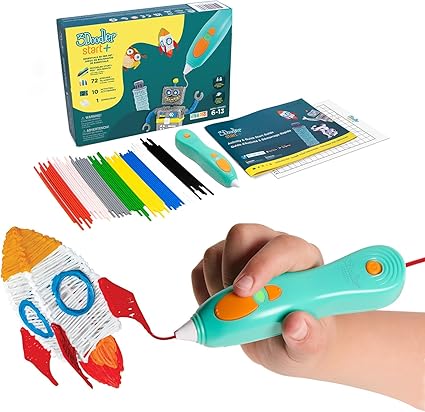
- The Essentials set includes the pen, 72 colored plastic strands, an activity guide with 10 projects and a USB-C charging cable.
- It uses its own plastic strands, not the PLA or ABS filament used by high-temperature pens: see 3Doodler Start refills.
- Price on Amazon.com: $53.82 (checked Nov 8, 2026).
The 3Doodler Start+ at a glance
price checked Nov 8, 2026
The Start+ Essentials set is the usual way to buy the pen. According to 3Doodler, the pen is safe for kids thanks to a cool-touch design with no hot external parts, works cordless with a single button, and is aimed at children from 6 years. The set includes 72 strands of colored plastic, an updated activity guide with 10 step-by-step projects and a USB-C charging cable. 3Doodler states a 2-year warranty.
View on Amazon*| Feature | 3Doodler Start+ |
|---|---|
| Type | Low-temperature 3D pen |
| Recommended age | 6+ (manufacturer) |
| Power | Rechargeable battery, USB-C charging |
| Controls | One button, dedicated reverse button |
| Plastic | 3Doodler Start strands (own format) |
| Warranty | 2 years (manufacturer) |
3Doodler Start vs. Start+
The Start+ is the updated version of the original Start. According to 3Doodler, it is more comfortable to hold, starts faster, runs longer on a charge, and adds a dedicated reverse button and a removable access door that make changing colors easier. Both use the same type of low-temperature plastic strands. If you find an original Start for less, it still works the same way, but the Start+ is the version sold today.
Which set to buy
- Essentials pen set: pen, 72 strands, activity guide and charging cable. The right choice for a first pen.
- Bundles with extra plastic or accessories (such as maker or starter bundles): more strands and sometimes stencils or a doodle pad for drawing on. Worth it if the pen will be used a lot.
- Themed and classroom sets (such as robotics or education learning packs): extra parts and activities, or several pens for schools.
Set contents change over time: compare what’s included and the number of strands, and remember that refills can be bought separately later.
How to use the 3Doodler Start
- Charge the pen fully with the USB-C cable before the first use.
- Insert a plastic strand through the access door, following the manual.
- Press the button and wait until the plastic starts coming out of the tip.
- Draw flat first: trace the projects from the activity guide or a stencil, keeping the tip close to the surface.
- Build in 3D: draw separate flat parts, let them cool and join them with a line of plastic, or draw slowly upward.
- Change color with the reverse button: back the strand out, then insert the next one.
Drawing techniques and project ideas for 3D pens are explained in our guide to first projects. Adults should supervise young children, as with any electrical toy.
Refills and plastic
The Start+ takes 3Doodler Start plastic strands, not the PLA or ABS filament used by high-temperature pens. You can buy official refill packs, and some third-party brands sell strands advertised as compatible with the Start. Everything about sizes, packs and alternatives is on our page about 3Doodler Start refills.
Official refill pack: 3Doodler Start refills* ($31.01).
Troubleshooting
| Problem | Likely cause | What to try |
|---|---|---|
| Pen doesn’t start | Battery empty | Charge fully with the USB-C cable |
| Plastic doesn’t come out | Strand not inserted far enough, strand stuck | Use the reverse button to back the strand out, then reinsert it |
| Strand stuck inside | Broken or too-short strand, non-compatible plastic | Reverse, remove the strand, use full-length official or compatible strands |
| Light flashing or unusual behavior | Status or error indication | Check the meaning of the lights in the manual, charge the pen |
Don’t open the pen or force the nozzle: if the reverse button and a fresh strand don’t help, contact 3Doodler support, especially while the pen is under warranty.
Alternatives for older kids and adults
The Start+ is designed for children and uses soft, low-temperature plastic. Teens and adults who want finer control and stronger results usually prefer a high-temperature 3D pen that takes standard 1.75 mm PLA or ABS filament, with adjustable speed and temperature. Those pens get hot at the tip and need supervision for kids. More about choosing a 3D pen, including high-temperature pens, is on our 3D pen page.
FAQ
What age is the 3Doodler Start for?
3Doodler recommends the Start+ for children aged 6 and up. It is designed without hot external parts, but adults should supervise young children.
What’s the difference between the 3Doodler Start and Start+?
The Start+ is the updated version: according to 3Doodler it is more comfortable, starts faster, has a longer battery life, a dedicated reverse button and a removable door for easier color changes.
What comes in the 3Doodler Start+ Essentials set?
The pen, 72 strands of colored plastic, an activity guide with 10 step-by-step projects and a USB-C charging cable, according to the Amazon.com listing.
Can the 3Doodler Start use regular 3D pen filament?
No. It uses its own 3Doodler Start plastic strands, not the PLA or ABS filament used by high-temperature pens. Use official refills or strands sold as compatible with the Start.